DomendraPOS Documentation
Everything you need to run a modern multi-branch retail business — point-of-sale, inventory, accounting, customers, suppliers, analytics, role-based security, and more. This guide walks you through every module with annotated screenshots, actionable steps, and downloadable CSV samples.

Getting Started
Set up your workspace, log in, and navigate the main layout.
1. Create a workspace
On the login screen, click “New to DomendraPOS? Create a workspace”. Fill in the workspace name, your admin email, currency (e.g. KSh for Kenya Shilling), and timezone. After you submit, you receive a confirmation email and your tenant (workspace) is provisioned.
2. Log in
3. Navigate the dashboard
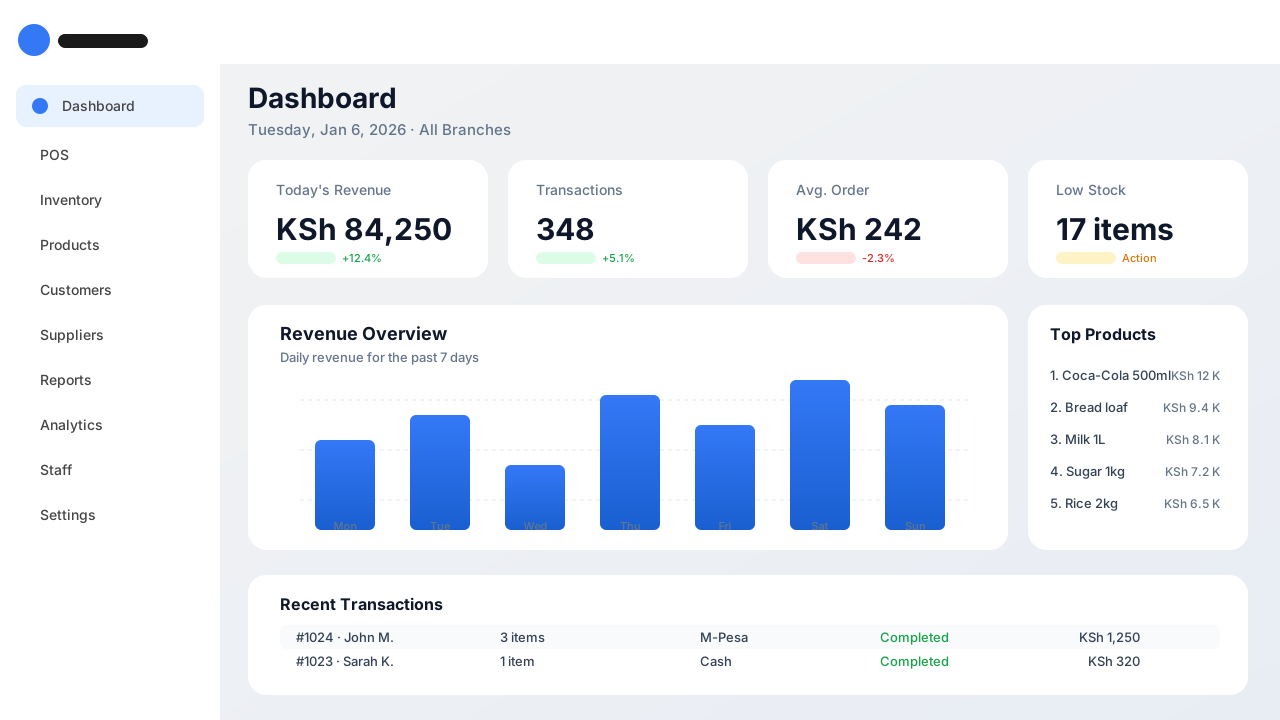
The main layout has three regions:
4. Select a branch
Use the branch selector in the top app bar (top right). The default is “All Branches”. When you select a specific branch, all subsequent transactions, stock views, and reports are scoped to that branch.
Point of Sale (POS)
Make sales fast — scan, tap, accept payments, and issue receipts.
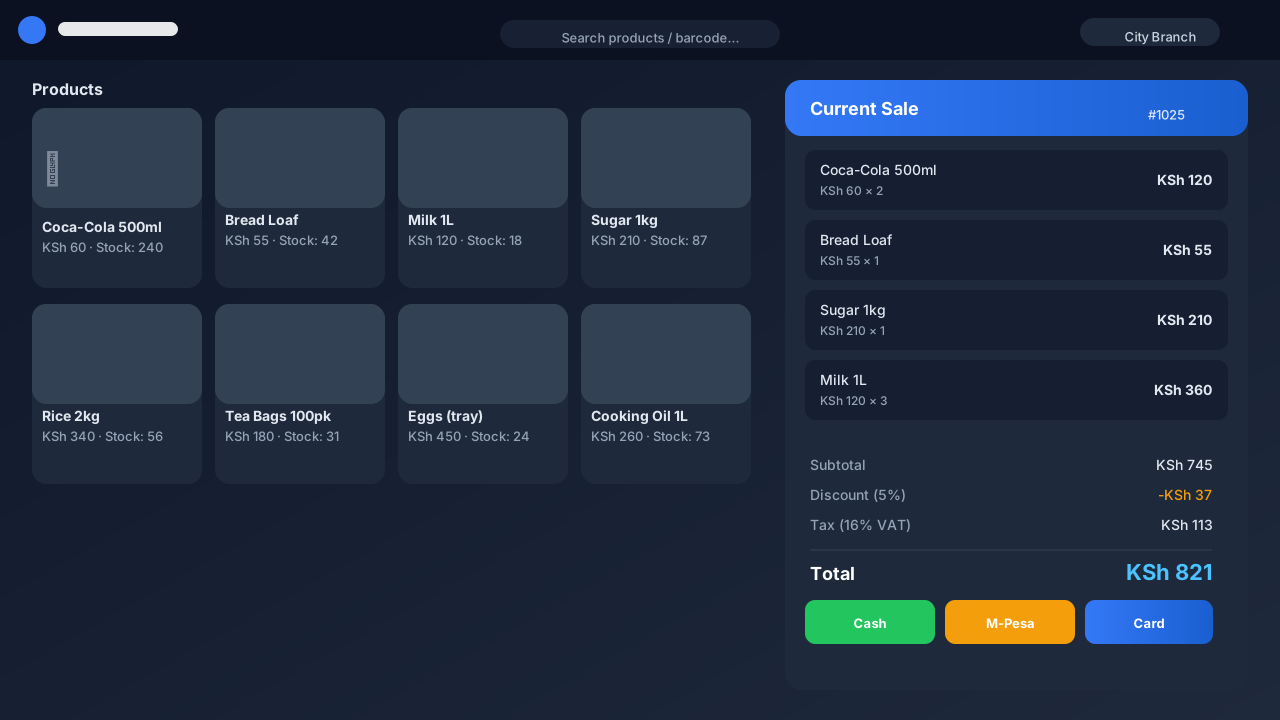
Payment methods
Record a cash payment. Enter the amount tendered to compute change.
Mobile money. Enter customer phone number and STK push reference.
Credit / debit card. Record the gateway reference for reconciliation.
POS features
Inventory
Track stock-on-hand across branches, adjust quantities, transfer stock, and get low-stock alerts.
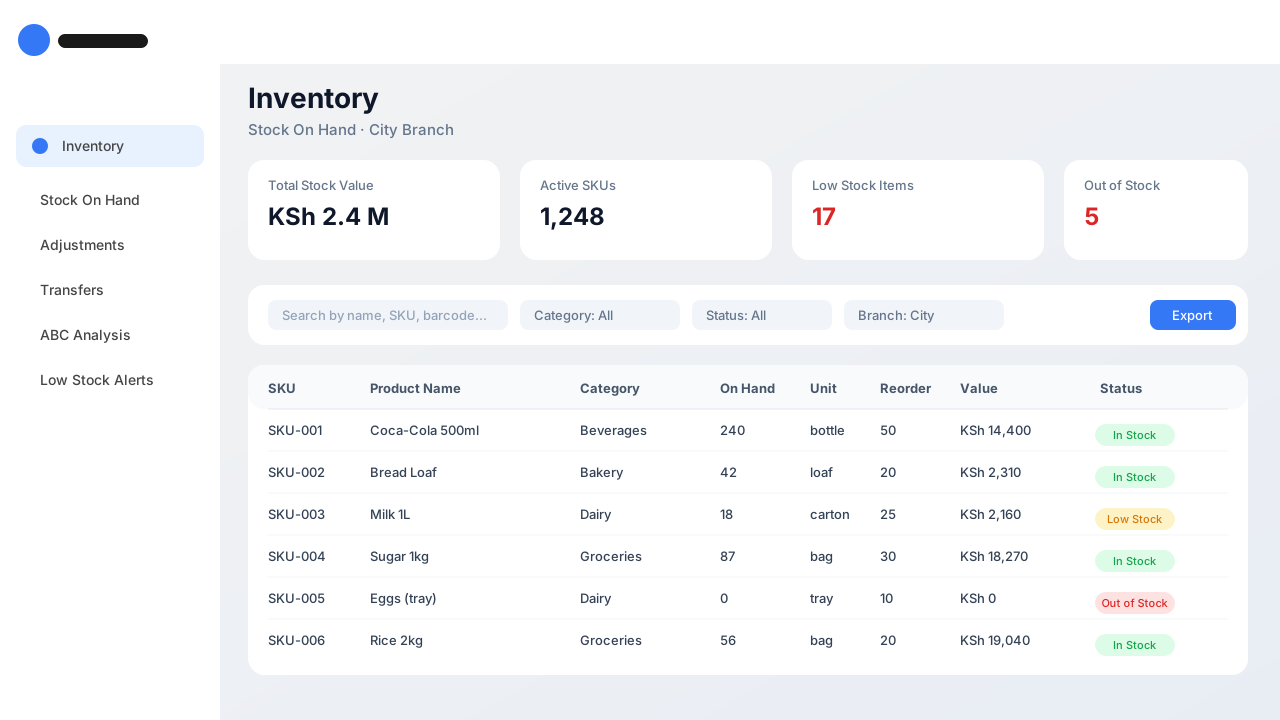
Core concepts
Stock movements
Sample stock data (exportable)
A preview of the data returned by the inventory export endpoint. Click Download to save it as CSV.
Sku | Product | Category | On hand | Unit | Reorder point | Value | Status |
|---|---|---|---|---|---|---|---|
| SKU-001 | Coca-Cola 500ml | Beverages | 240 | bottle | 50 | 14400 | In Stock |
| SKU-002 | Bread Loaf | Bakery | 42 | loaf | 20 | 2310 | In Stock |
| SKU-003 | Milk 1L | Dairy | 18 | carton | 25 | 2160 | Low Stock |
| SKU-004 | Sugar 1kg | Groceries | 87 | bag | 30 | 18270 | In Stock |
| SKU-005 | Eggs (tray) | Dairy | 0 | tray | 10 | 0 | Out of Stock |
Products
Define the catalog: products, brands, categories, units of measure, variants, and bulk import.
Sample product catalog data (exportable):
Export your full product catalog with prices and stock for spreadsheet analysis.
Sku | Name | Category | Brand | Unit | Cost price | Selling price | Tax rate | Is active |
|---|---|---|---|---|---|---|---|---|
| SKU-001 | Coca-Cola 500ml | Beverages | Coca-Cola | bottle | 45 | 60 | 16 | true |
| SKU-002 | Bread Loaf | Bakery | Prima | loaf | 40 | 55 | 0 | true |
| SKU-003 | Milk 1L | Dairy | Brookside | carton | 105 | 120 | 0 | true |
| SKU-004 | Sugar 1kg | Groceries | Mumias | bag | 190 | 210 | 16 | true |
| SKU-005 | Eggs (tray) | Dairy | Kenchic | tray | 420 | 450 | 0 | false |
Customers
Build a customer CRM — loyalty points, store credit, purchase history, and outstanding balances.
Customer balances export
Who owes you how much. Filter the list on the Customers page and export outstanding balances.
Name | Phone | Email | Loyalty points | Credit balance | Total spent |
|---|---|---|---|---|---|
| John Ade | +254712345678 | john@example.com | 340 | 1200 | 38400 |
| Sarah Kamau | +254722334455 | sarah@example.com | 1280 | 0 | 124500 |
| Moses Otieno | +254733445566 | moses@example.com | 75 | 450 | 7300 |
| Mary Wanjiru | +254700112233 | mary@example.com | 850 | 0 | 56700 |
| David Kiptoo | +254711998877 | david@example.com | 12 | 2100 | 1800 |
Suppliers and Purchasing
Manage suppliers, raise purchase orders (POs), receive goods into stock, and track payables.
Sample purchase order data (exportable):
POs by status with line totals and supplier info.
Po number | Supplier | Branch | Status | Order date | Total |
|---|---|---|---|---|---|
| PO-2026-001 | Coca-Cola Ltd | City | Approved | 2026-01-04 | 48000 |
| PO-2026-002 | Prima Bakeries | Town | Received | 2026-01-05 | 12000 |
| PO-2026-003 | Brookside Dairy | City | Pending | 2026-01-06 | 38500 |
| PO-2026-004 | Mumias Sugar | Town | Draft | 2026-01-06 | 24000 |
| PO-2026-005 | Kenchic Ltd | Highway | Received | 2026-01-03 | 16800 |
Reports
Generate sales summaries, profit and loss, VAT returns, and stock valuation for any period and branch.
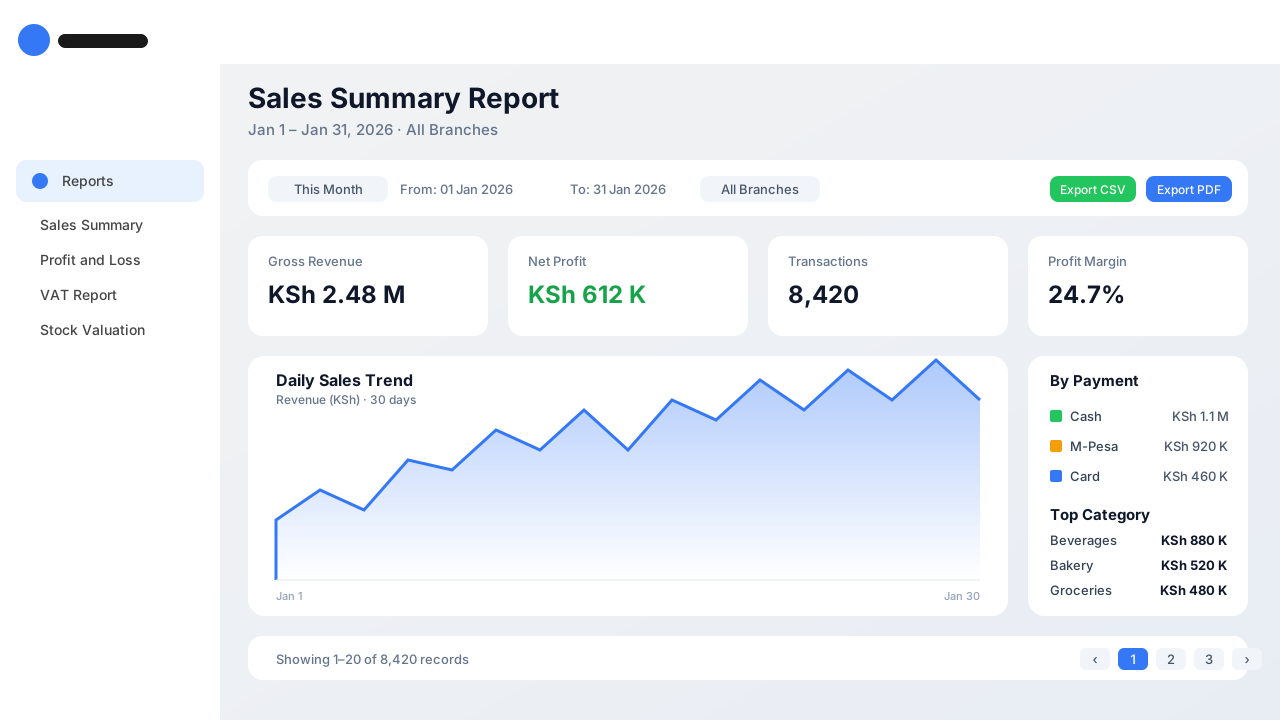
Interactive sample — Sales by day
A sample chart produced by the Reports module. Export the underlying data as CSV.
CSV data is generated from the chart series and can be opened in Excel or Google Sheets.
Analytics
Interactive dashboards: ABC analysis, revenue trends, top products, staff performance, peak hours.
Visualize which products generate the most revenue. Export for further analysis.
CSV data is generated from the chart series and can be opened in Excel or Google Sheets.
Accounts and Finance
Chart of accounts, journal entries, ledgers, VAT, and financial statements.
Sample journal entries (exportable):
Export posted journal entries with debit and credit lines for accounting review.
Entry no | Date | Account | Description | Debit | Credit |
|---|---|---|---|---|---|
| JE-1001 | 2026-01-06 | Cash | Cash sale #1024 | 1250 | 0 |
| JE-1001 | 2026-01-06 | Sales Revenue | Cash sale #1024 | 0 | 1078 |
| JE-1001 | 2026-01-06 | VAT Output | VAT on sale #1024 | 0 | 172 |
| JE-1002 | 2026-01-06 | M-Pesa | M-Pesa sale #1025 | 821 | 0 |
| JE-1002 | 2026-01-06 | Sales Revenue | M-Pesa sale #1025 | 0 | 708 |
All Modules at a Glance
A quick reference table of every module and its main capabilities.
Module | What it does | Roles | ||
|---|---|---|---|---|
| Dashboard | KPI overview: revenue, transactions, low stock, top products | All | ||
| POS | Make sales, accept payments, print receipts | Cashier, Manager | ||
| Inventory | Track stock, adjustments, transfers, ABC analysis | Manager, Stock Clerk | ||
| Products | Catalog management, bulk Excel import, variants | Manager | ||
| Customers | CRM, loyalty, store credit, balances | Cashier, Manager | ||
| Suppliers | Supplier directory and PO management | Manager | ||
| Purchasing | Raise, approve, receive purchase orders | Manager | ||
| Reports | Sales, P&L, VAT, stock valuation; CSV / PDF export | Manager, Accountant | ||
| Analytics | Interactive dashboards and trends | Manager, Owner | ||
| Accounts | Chart of accounts, ledger, journal, statements | Accountant | ||
| IAM and Security | Users, roles, permissions, sessions | Admin | ||
| Audit Logs | Immutable trail of every user action | Admin, Auditor | ||
| Branches | Multi-branch management | Admin | ||
| API Billing | Usage metering and subscription | Admin |
Roles, Permissions, and Audit
Fine-grained Role-Based Access Control (RBAC) with audit logging. Every action is recorded.
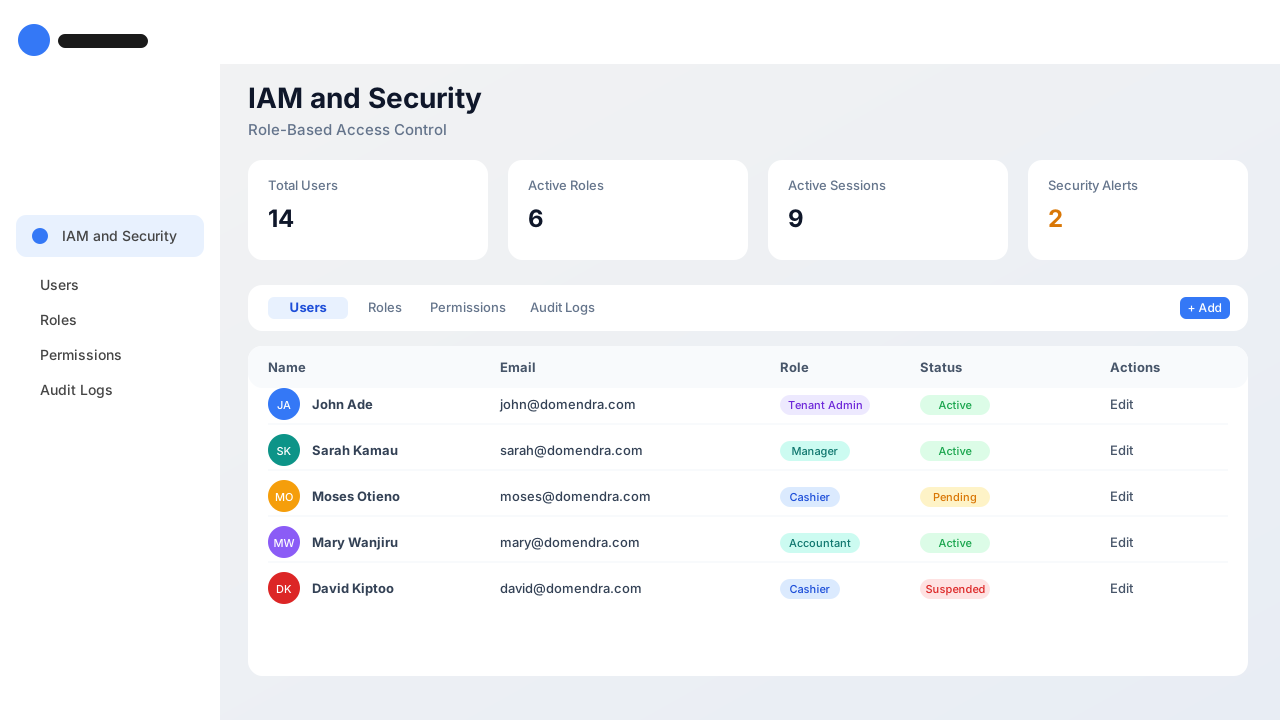
Default roles
Role | Description | Can make sales | Can manage stock | Can manage users | Can view reports |
|---|---|---|---|---|---|
| Super Admin | Platform owner — manages all tenants and billing | No | All tenants | All tenants | All tenants |
| Tenant Admin | Owner of a workspace — full access | Yes | All branches | Yes | Yes |
| Manager | Branch manager — operations, approvals, reports | Yes | Own branch | Own branch | Own branch |
| Accountant | Books, VAT, financial statements | No | View only | No | Yes |
| Cashier | Front-of-house sales and shifts | Yes | No | No | Own sales |
| Auditor | Read-only access to audit logs and reports | No | View only | View only | Yes |
Audit logs
Every login, create, update, delete, permission change, and export is recorded with user, IP, module, action, and timestamp. Tenant admins and auditors can filter and export the audit trail.
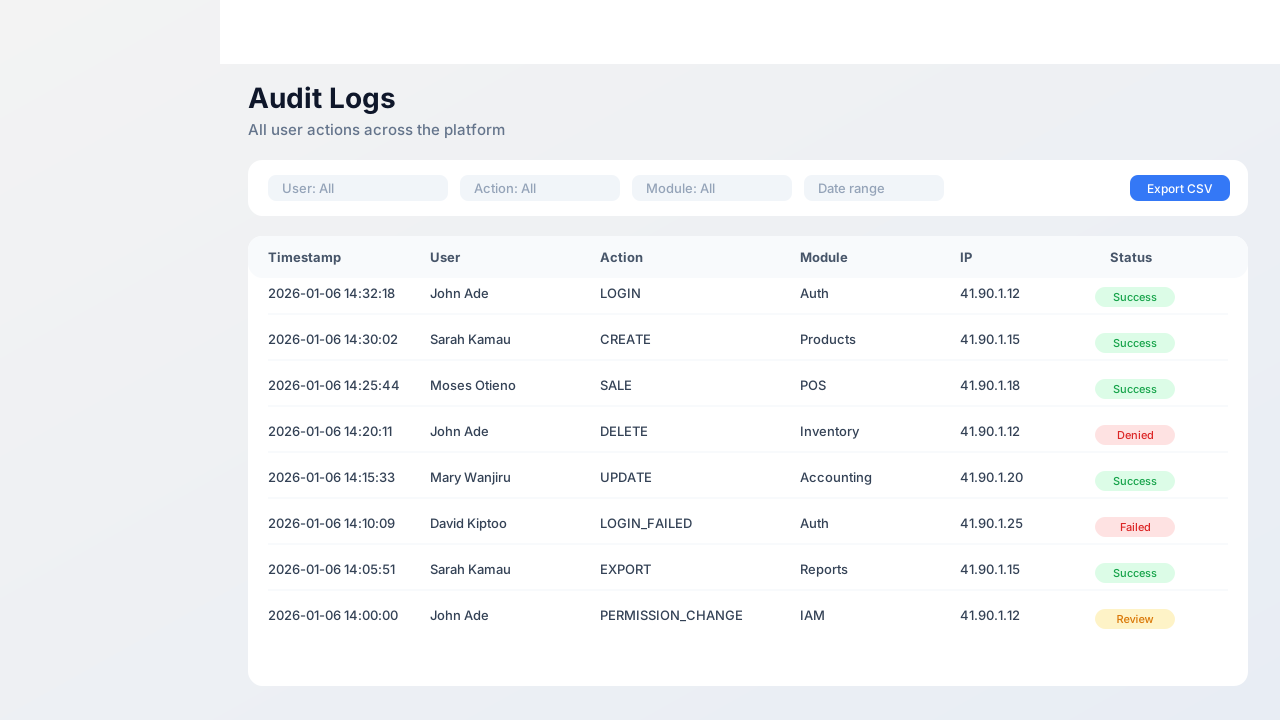
Filter the audit log by user, action, module, date, and export for compliance reporting.
Timestamp | User | Action | Module | Ip address | Status |
|---|---|---|---|---|---|
| 2026-01-06 14:32:18 | John Ade | LOGIN | Auth | 41.90.1.12 | Success |
| 2026-01-06 14:30:02 | Sarah Kamau | CREATE | Products | 41.90.1.15 | Success |
| 2026-01-06 14:25:44 | Moses Otieno | SALE | POS | 41.90.1.18 | Success |
| 2026-01-06 14:20:11 | John Ade | DELETE | Inventory | 41.90.1.12 | Denied |
| 2026-01-06 14:15:33 | Mary Wanjiru | UPDATE | Accounting | 41.90.1.20 | Success |
API and Exports
All list pages expose a REST API at /api and support CSV export. Here is how.
Authentication
The frontend uses JWT access and refresh tokens. The token is sent as Authorization: Bearer <access_token>. Access tokens expire every 15 minutes and are refreshed automatically on 401 responses.
POST /api/auth/login/
Content-Type: application/json

{
  "email": "you@example.com",
  "password": "your-password"
}
Refreshing the token
POST /api/auth/refresh/
Authorization: Bearer <refresh_token>
Listing resources
GET /api/products/?search=bread&category=groceries&ordering=-created_at
Authorization: Bearer <access_token>

# Response shape:
{
  "count": 128,
  "next": "https://…/api/products/?page=2",
  "previous": null,
  "results": [ {…}, {…}, … ]
}
Audit trail / Logs
Accept: text/csv instead of JSON to return a CSV stream directly. Frequently Asked Questions
Contact your workspace admin or visit our support center. If you are a super-admin, open the Platform Dashboard for tenant management.